8 min read
Spotlight Indexing High CPU on Mac: mds_stores Explained
Why mds, mds_stores and mdworker use so much CPU after a macOS 27 update, how long Spotlight indexing takes, and what to do when it never stops.
performancespotlightmacos-27
Freshist's menu bar HUD shows live CPU, GPU, memory, disk, network and battery at a glance. When you want the full picture, the Status dashboard shows the processes behind the numbers.
Launch price$19$9 once · lifetime updates · 3 Macs · 14-day refund
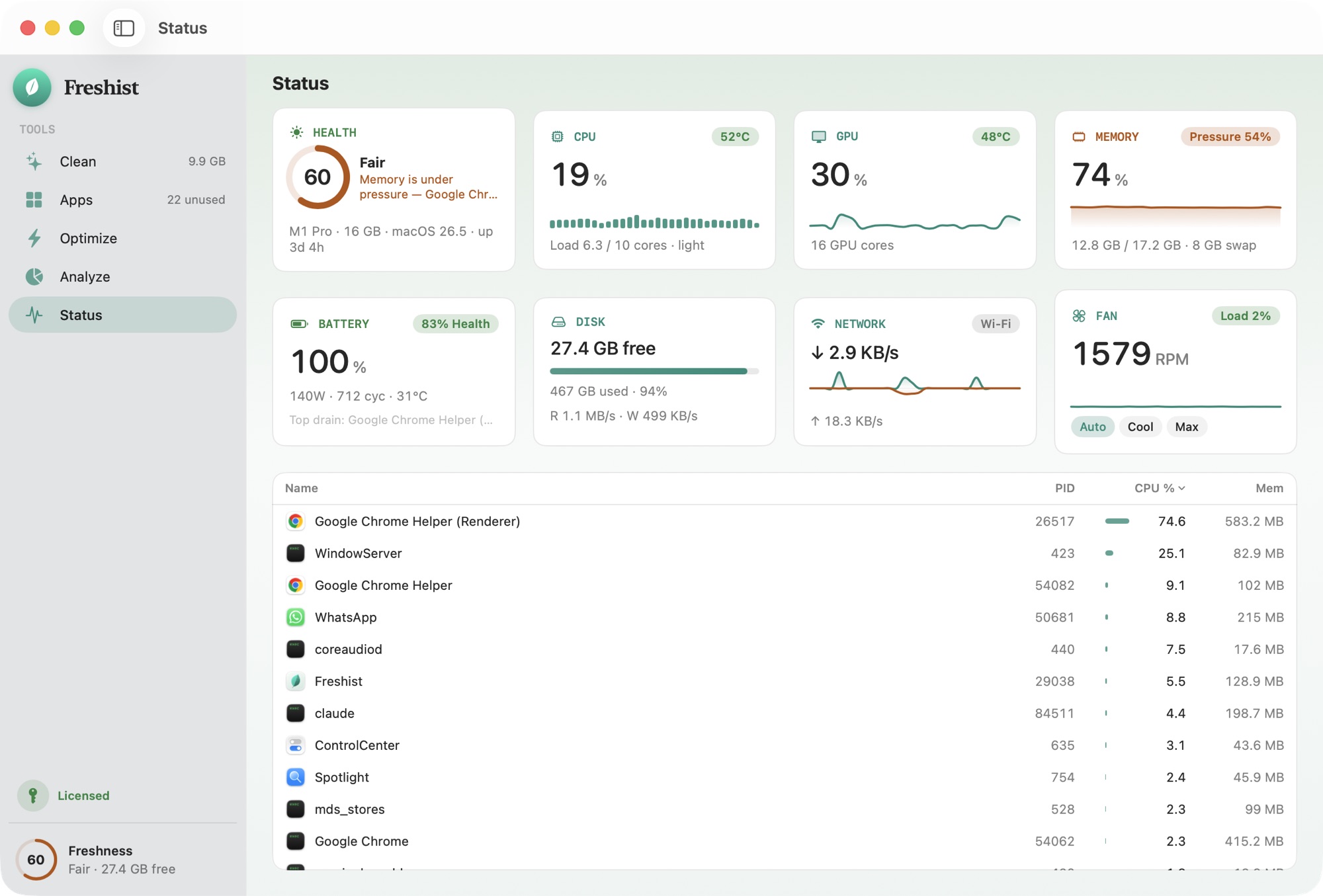
A live bento dashboard — health score, CPU, GPU, memory pressure, battery, disk, network and fan — plus the processes actually using your machine right now.
The HUD lives in your menu bar with live CPU, GPU, memory, disk, network and battery — plus real controls: take the fans to Cool or Max, keep the screen awake, eject every drive in one click. If Freshist has taken over the fans, quitting it or removing its helper hands fan control back to macOS.
A monitor reads your Mac's sensors and process list, so it should stay quiet and local. Freshist does both: readings stay on your Mac, and the HUD only shows numbers. It doesn't pop up warnings designed to make you buy something.
No analytics, no accounts, no tracking network calls. It's a design constraint, not a promise.
No nagging, no upsell screens, no manufactured urgency. One quiet app that respects your time.
The full list of protected locations and how files owned by macOS are handled: what Freshist never deletes.
Comparison reflects the common Mac-cleaner category at time of writing, not any single product. See the full comparison.
The HUD sits in your menu bar. Click it and a popover opens with your Mac's vitals: CPU, GPU, memory, disk, network and battery, updating live. You don't need to open a window or switch apps. It's meant for the moment you hear the fans spin up or feel the Mac slow down and want to know why.
The popover also has a few real controls:
When you want more than a glance, open Status in the app. It's a live dashboard with a health score, CPU, GPU, memory pressure, battery, disk, network and fans in one view.
Below the numbers is the part that answers "why": the processes actually using your Mac right now, ranked by CPU, power and memory. A process that has used most of your CPU for ten minutes is easy to spot, and so is an app that's draining the battery in the background.
Most of the time you won't need it. It's useful when something feels off:
CPU isn't the only thing worth watching. When the battery drains faster than usual, sorting the process list by power shows which app is responsible, even if its CPU use looks modest. A browser tab playing video in the background or a sync client catching up after a few days offline are common causes.
The network reading helps with a different question: whether your Mac is busy talking to the internet. A large upload, a cloud backup or a photo library syncing can keep the Mac and its network busy for a long time. Seeing that traffic in the menu bar explains why a video call stutters or a download crawls, without opening another app.
A Mac with little "free" memory is usually fine. macOS fills spare memory with caches on purpose, because empty memory does nothing useful. The number that matters is memory pressure, which shows how hard macOS is working to make room. Status shows memory pressure for that reason. If it stays high and your Mac feels slow, look at the processes using the most memory.
Activity Monitor comes with macOS, it's free, and it shows more detail per process than any menu bar app. Keep using it for deep dives. What it doesn't give you is a quick look from the menu bar, a single view of GPU, fans, battery and network, or the extra controls. Freshist's HUD and Status cover that everyday glance. The two work fine side by side.
Freshist is built in SwiftUI for macOS 14 Sonoma or later, on Apple silicon and Intel. It doesn't bundle a browser engine. It also sends no telemetry: your process list and readings stay on your Mac. The app also includes Privacy Check, which shows which apps are using your camera and microphone right now.
The monitor isn't a separate subscription. Status and the menu bar HUD come with Clean, Apps, Optimize and Analyze in a single license: $9 once, with lifetime updates, on up to 3 Macs, and a 14-day refund if it isn't for you.
macOS doesn't show CPU in the menu bar on its own. Activity Monitor can put a small CPU graph in the Dock, and apps such as Freshist add a menu bar monitor. Freshist's HUD shows live CPU, GPU, memory, disk, network and battery in one popover.
A monitor that reads sensors and the process list uses little power. Freshist is a native SwiftUI app, not a web app in a wrapper, so it doesn't add a browser engine to your memory use.
The HUD is the quick look in your menu bar, with live vitals and a few controls. Status is the full dashboard inside the app, with a health score, memory pressure, fans and the top processes by CPU, power and memory.
No. Status and the menu bar HUD come with the same one-time $9 license as the rest of Freshist, including lifetime updates, on up to 3 Macs.
Usually not. macOS uses spare memory for caching on purpose. Memory pressure is the better signal: if it stays high and your Mac feels slow, look at which processes are using the most memory.
Freshist next to the typical Mac cleaner, row by row.
Install, activate a license, Full Disk Access and troubleshooting.
Protected locations, files owned by macOS, and why everything else goes to the Trash.
8 min read
Why mds, mds_stores and mdworker use so much CPU after a macOS 27 update, how long Spotlight indexing takes, and what to do when it never stops.
7 min read
Why Mac fans spin up, how warm is normal, how to find the process causing the heat with Activity Monitor, and when manual fan control actually helps.
8 min read
Why a Mac feels slow or warm for a while after updating to macOS 27 Golden Gate, how long that lasts, and what to check if it doesn't settle down.
7 min read
What Open at Login, App Background Activity (formerly Allow in the Background) and launch agents are, and how to review them safely on macOS 27 and 26.
One-time $9. Lifetime updates. 3 Macs. A 14-day refund if it isn't for you.
Launch price — $19 $9 for a limited time.