11 min read
Do You Need a Mac Cleaner? An Honest Buyer's Guide
Most Macs don't strictly need a cleaner. What macOS already handles, when one actually helps, how to choose a safe one, and the red flags to avoid.
buying-guidecleanupprivacystorage
Freshist clears caches, logs and developer junk from your Mac. You see every file and its size first, only low-risk items are pre-selected, and what you approve goes to the Trash.
Launch price$19$9 once · lifetime updates · 3 Macs · 14-day refund
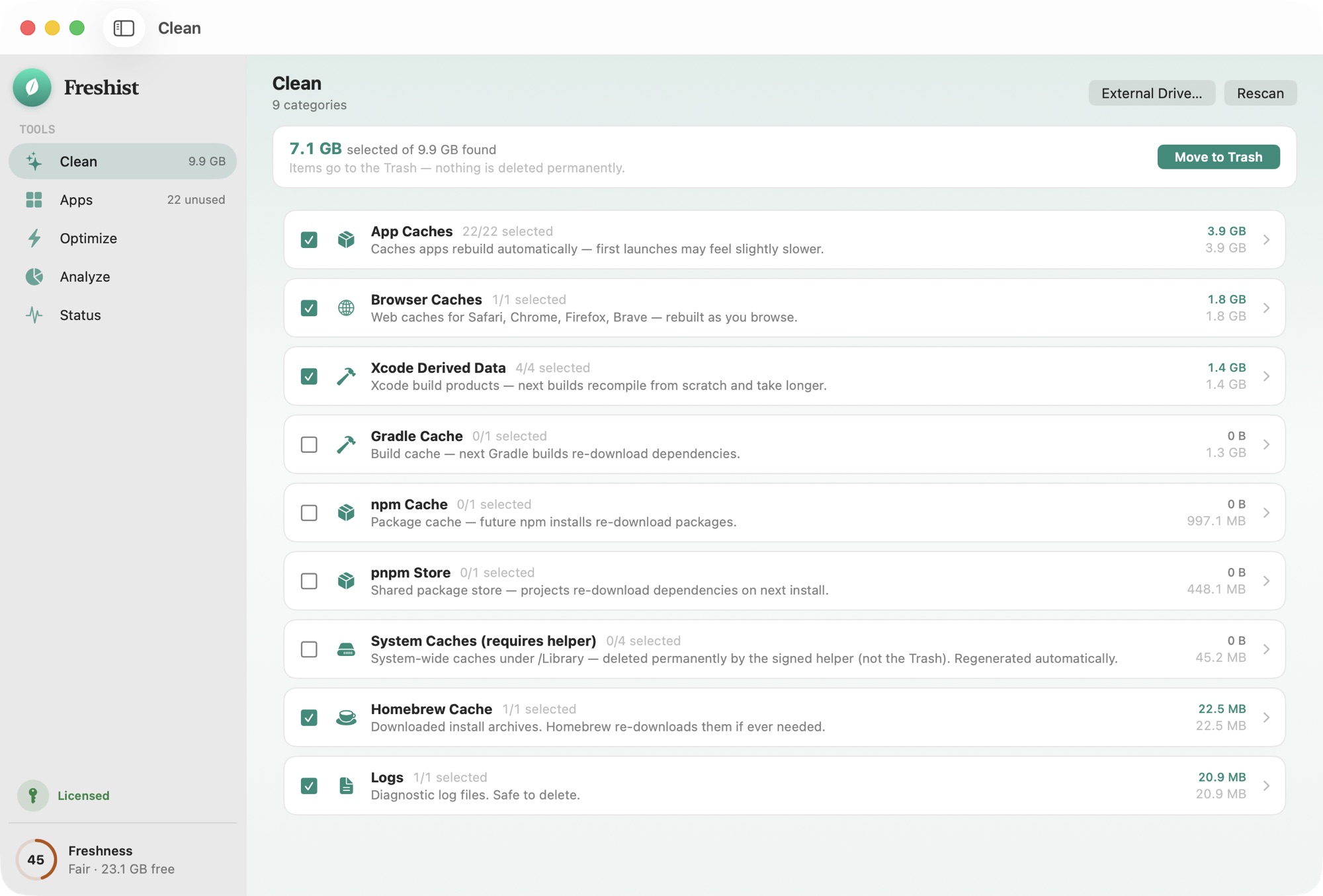
Caches, logs, crash reports and heavy developer junk — Xcode derived data, npm, Homebrew. Freshist finds what's safe to clear and lists every byte before it moves.
Every file is listed with its exact size before anything happens. No blind “one-click clean”.
Risky or ambiguous items are never pre-selected. They're flagged “review” for you to decide.
Everything goes to the Trash so you can undo. Permanent deletion is separate and explicitly confirmed.
A plain, local log of every destructive action lives on your Mac, readable any time.
The full list of protected locations and how files owned by macOS are handled: what Freshist never deletes.
Comparison reflects the common Mac-cleaner category at time of writing, not any single product. See the full comparison.
Most of the space a cleaner can safely give back is data that macOS or your apps will rebuild: caches, logs, crash reports and saved window state. Removing it doesn't break anything, because the app that made it writes a fresh copy when it needs one.
Freshist's Clean tool looks in those places:
~/Library/Caches, and system caches in /Library/Caches through a signed helper.The cache guide lists every category with its exact path, its risk level and whether it's selected by default.
Each category in Clean has a risk level that comes from the app's own rules.
Before anything moves you see the whole list with sizes. You can untick any item, pre-selected ones included, and nothing is removed until you confirm.
Anything removed from your own user folder goes to the Trash. If you notice later that you needed it, put it back from the Trash like any other file.
Some categories are owned by macOS (root), such as the system caches in /Library/Caches and /Library/Logs. Those can't go to your Trash. They are never pre-selected, and if you choose them, Freshist's signed privileged helper deletes them permanently. The helper only accepts items one level inside those two folders and rejects everything else. Every destructive action is also written to a local log at ~/Library/Logs/Freshist/.
Every path is checked against protection rules before it moves. Freshist won't move macOS system folders. It also won't move your home folder, Library, Desktop, Documents or Downloads folders themselves, and it refuses any path that belongs to endpoint security or MDM agents, which matters on a work Mac. Symlinks are resolved before the check, so a path can't get past a rule by being written differently. The full rules are on what Freshist never deletes.
If you write code, your biggest caches probably aren't in ~/Library/Caches. Xcode's derived data and device support files, package manager stores and IDE caches can each grow large over time. Clean groups them by tool, so you can clear Xcode's build products and leave your npm store alone, or do the opposite. The guide to developer caches on a Mac explains what each one is and when clearing it makes sense.
Clean can also scan an external drive for the metadata macOS leaves on it, such as Spotlight indexes, .fseventsd and .DS_Store files. Choose External Drive… in Clean and pick the drive. Anything you remove goes to the Trash, and macOS rebuilds this data when you reconnect the drive.
A cleaner frees space. It won't make a healthy Mac noticeably faster, and Freshist doesn't claim it will. Caches also come back as you use your apps, which is normal, so clearing them every day achieves little. The useful moments are when your disk is nearly full, after you've removed a large tool or project, or when you want to see where the space went. If you only need a rough overview, the built-in Storage settings are worth a look first.
Freshist is a one-time purchase: $9, with lifetime updates, so every future version is free with the same license. One license activates on up to 3 Macs, there's no account to create, and if it isn't for you there's a 14-day refund, no questions asked.
Plenty of Mac cleaners are sold as yearly subscriptions instead. If you're comparing, what to check before buying a Mac cleaner covers what "lifetime" can and can't mean.
Scanning is always free, so you can see what Freshist would clean on your Mac before you pay. The free trial includes 2 cleans so you can try the whole flow. Freshist runs on macOS 14 Sonoma or later, on Apple silicon and Intel. You download it from fresh.ist as an Apple-notarized app; it isn't sold on the App Store.
Freshist lists every item with its size before anything moves, and only low-risk categories are pre-selected. Files from your user folder go to the Trash, so you can put them back. It also refuses to touch macOS system folders, your main personal folders and anything that belongs to endpoint security or MDM tools.
Not always. macOS manages a lot on its own, and System Settings › General › Storage covers the basics. A cleaner is useful when space is tight, when developer tools have filled your disk with caches, or when you want to see exactly what is taking up room before you remove it.
No. It costs $9 once and includes lifetime updates, so every future version is free with the same license. One license activates on up to 3 Macs.
No. Clean only looks at caches, logs and similar data that macOS or your apps rebuild, not at your documents. Clearing Saved Application State means apps open with fresh windows instead of restoring the old ones. Preferences aren't part of Clean.
No. The app has no telemetry, no analytics and no account. Scans run entirely on your Mac, and file names, paths and scan results never leave it.
Every cache category, its exact path, risk level and whether it's pre-selected.
Protected locations, files owned by macOS, and why everything else goes to the Trash.
The folders Freshist checks for an app's leftovers when you uninstall it.
Freshist next to the typical Mac cleaner, row by row.
11 min read
Most Macs don't strictly need a cleaner. What macOS already handles, when one actually helps, how to choose a safe one, and the red flags to avoid.
7 min read
One-time license or subscription? How Mac cleaner pricing really works, what "lifetime" often excludes, and 7 checks to make before you buy.
7 min read
Where Xcode, simulators, npm, pnpm, Homebrew, Docker, pip, uv and AI model caches live on a Mac, what rebuilds, and each tool's own cleanup command.
7 min read
Cleaners get Full Disk Access to your files. How to check what any Mac app sends home with built-in tools, and what a privacy-first cleaner looks like.
One-time $9. Lifetime updates. 3 Macs. A 14-day refund if it isn't for you.
Launch price — $19 $9 for a limited time.