8 min read
Is Manual Fan Control Safe on a Mac? Risks and Warranty
What fan control apps change on Apple silicon and Intel Macs, why slower fans are the risky direction, what the warranty says, and how to hand back.
performancefansmacos-27
Set your fans to Auto, Cool or Max from Freshist's menu bar HUD. Auto leaves them to macOS, and if Freshist has taken manual control, quitting the app or removing its helper hands control back.
Launch price$19$9 once · lifetime updates · 3 Macs · 14-day refund
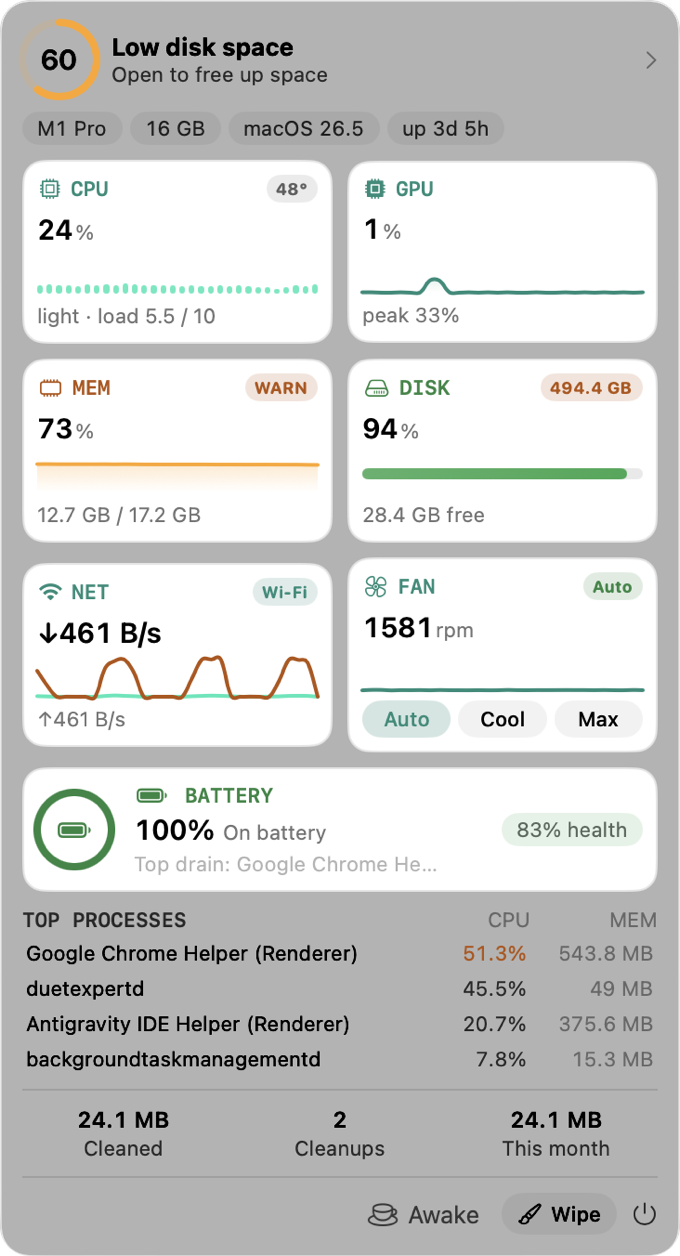
The HUD lives in your menu bar with live CPU, GPU, memory, disk, network and battery — plus real controls: take the fans to Cool or Max, keep the screen awake, eject every drive in one click. If Freshist has taken over the fans, quitting it or removing its helper hands fan control back to macOS.
For fan control, the safety question that matters most is whether macOS ends up back in charge. Auto leaves the fans to macOS. If Freshist has taken manual control, quitting the app or removing its helper hands fan control back to macOS, so a forgotten setting doesn't outlive the app.
No nagging, no upsell screens, no manufactured urgency. One quiet app that respects your time.
No analytics, no accounts, no tracking network calls. It's a design constraint, not a promise.
The full list of protected locations and how files owned by macOS are handled: what Freshist never deletes.
Comparison reflects the common Mac-cleaner category at time of writing, not any single product. See the full comparison.
Every Mac with a fan already controls it automatically. Sensors inside the machine track temperature, and the fans speed up under heavy work or in a warm room. On Intel Macs the System Management Controller (SMC) does this. On Apple silicon the same job is built into the chip's own system.
So fan control is optional, and macOS doesn't need help to keep a Mac safe. It balances cooling against noise, and sometimes you'd strike that balance differently: during a long export you might happily accept more noise for a cooler, steadier machine.
Freshist puts the fan controls in its menu bar HUD, next to your live CPU, GPU and memory readings:
You can check the effect yourself: switch to Cool during a build and watch the fans and CPU in the Status dashboard.
The most important part of any fan tool is how it lets go. If an app takes over the fans and then crashes, quits or gets deleted, the fans can be left at whatever speed it last set.
Freshist handles this explicitly. If it has taken manual control of the fans, it hands fan control back to macOS when you quit the app or when its helper is removed. You don't have to remember to switch back to Auto before closing it. If the preset was Auto, Freshist never took control in the first place, and there's nothing to hand back.
Pushing fans faster than macOS would choose generally costs noise, a bit of power and some fan wear. Pushing them slower works against the system that protects the chip, and that's where the risk is. Apple's warranty doesn't mention fan apps, but it does exclude damage from operating a Mac outside Apple's published guidelines.
Our guide on whether manual fan control is safe on a Mac goes through the risks and the warranty question in more detail.
Extra airflow helps most during long, heavy work such as video exports, large builds, 3D renders or long machine learning jobs. On those, a Mac can slow itself down to manage heat, and a cooler chip can hold its speed for longer.
It helps much less for short tasks. Opening apps, browsing and email rarely heat the chip enough for extra airflow to make a difference you'd notice. If your fans are loud during light use, the cause is usually a busy background process, not too little cooling. Start with why a MacBook's fan gets loud, and check whether Spotlight is re-indexing.
You don't need fan control to find out whether heat is a problem. Watch a long job instead. If an export or a build starts fast and gets slower as it goes, while the fans are already loud, the Mac is probably reducing performance to manage heat. If the job runs at a steady pace, extra airflow won't change much.
The surroundings matter too. A laptop on a bed or a sofa, or a desktop pushed against a wall, can't move air as freely as one on a hard, open surface. A clear desk and a cooler room do more than you might expect, and they work whether or not a fan app is installed.
Changing fan speed needs system-level access that ordinary apps don't have, so Freshist does it through its signed privileged helper. That's also why removing the helper ends Freshist's part in it: fan control goes back to macOS.
Fan control isn't a separate app or subscription. The HUD and its presets come with Clean, Apps, Optimize, Analyze and Status in a single license: $9 once, with lifetime updates, on up to 3 Macs, and a 14-day refund if it isn't for you. Freshist runs on macOS 14 Sonoma or later, sends no telemetry and needs no account.
Running fans faster than macOS chooses is generally low-risk: you trade noise and some fan wear for a cooler chip. Forcing them slower than macOS wants is the risky direction. Whatever tool you use, make sure it hands control back to macOS. Our guide on manual fan control covers the details.
If Freshist has taken manual control, it hands fan control back to macOS when you quit the app. The same happens if you remove its helper. If the preset was Auto, macOS was in charge all along.
MacBook Air models with Apple silicon have no fan, so there's nothing to control. They manage heat by adjusting performance instead.
More time at high speed means more noise and, in principle, more wear on a moving part. Apple doesn't publish fan lifetime ratings. Using Max for long renders, builds or exports rather than all day is a sensible middle ground.
No. The fan presets are part of the menu bar HUD, which comes with the same one-time $9 license as the rest of Freshist, with lifetime updates on up to 3 Macs.
Freshist next to the typical Mac cleaner, row by row.
Install, activate a license, Full Disk Access and troubleshooting.
Protected locations, files owned by macOS, and why everything else goes to the Trash.
8 min read
What fan control apps change on Apple silicon and Intel Macs, why slower fans are the risky direction, what the warranty says, and how to hand back.
7 min read
Why Mac fans spin up, how warm is normal, how to find the process causing the heat with Activity Monitor, and when manual fan control actually helps.
8 min read
Why mds, mds_stores and mdworker use so much CPU after a macOS 27 update, how long Spotlight indexing takes, and what to do when it never stops.
One-time $9. Lifetime updates. 3 Macs. A 14-day refund if it isn't for you.
Launch price — $19 $9 for a limited time.